

A ticketing API, webhooks and MCP server in the core plan
The REST API and webhooks work with their own keys for each company. An MCP server also lets AI assistants read, create and reply to tickets. All of it is part of the integration interface and included in the core plan.
How to connect a tool
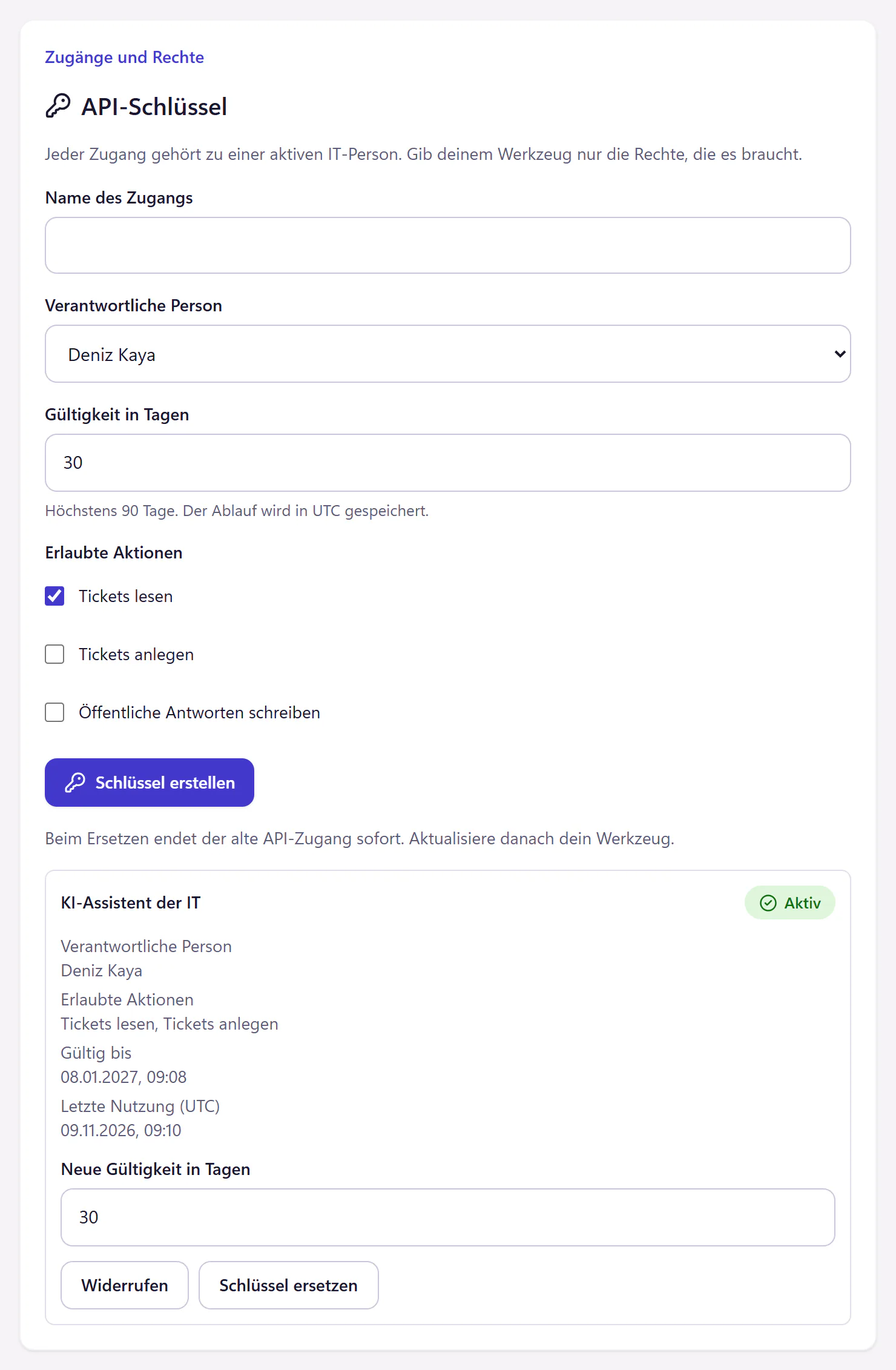
Create a key
As an admin, create it in the IT console under "Anbindungen" (Integrations). Every key has a name, a responsible person from IT, a validity of at most 90 days and only the permissions the tool needs. The key is shown only once.
Choose API or webhook
Use the REST API when your program asks for data. Use a webhook when 404desk should tell your program about an event, such as every new ticket.
Connect MCP
Enter the address of the MCP server and the key in your AI assistant.
Revoke unused access
When a program no longer needs access, revoke its key. It stops working immediately.
What admins use the interfaces for
A script that creates a ticket from your HR software for every new starter. A webhook that starts a small program for every new ticket, which posts the ticket number to a Teams channel. A query that pulls tickets with their status and dates into your own reporting. An AI assistant that summarises the new tickets each morning.
- REST API
- Read tickets, create tickets and reply to them publicly, with keys per company. Up to 60 requests per minute per key and 300 per company.
- Permissions per key
- Reading tickets, creating tickets and writing public replies can each be allowed separately, so a read-only key is possible.
- Webhooks
- Three events go to an HTTPS address that you set: ticket created, status changed and public reply. The message is signed and contains the ticket number and status, but no ticket text, names or files.
- MCP server
- List tickets, read a ticket, create a ticket and reply publicly, for assistants that support MCP.
- Price
- Included in the core plan, with no extra charge per call.
Manage keys securely
Give every program its own key, so you can revoke a single one without changing everything else. Do not put keys in scripts that sit on a network drive. Keep them in a password manager or a secrets vault instead. Give each key only the permissions it needs. Because keys expire after 90 days at most, replacing them shows you which ones are still in use.
Who the interfaces are for
They are for admins who do a bit of scripting and do not want to wait for features. If you know PowerShell, you can work with the REST API. If you already use an AI assistant that speaks MCP, the MCP server puts your tickets in the same window. Review the data-handling terms of any external assistant you connect.
If you do not want to program at all, automations in plain language will take you a long way.
Questions about the API, webhooks and MCP
What is an MCP server?
MCP stands for Model Context Protocol, an open standard that lets AI assistants use tools from other applications. The MCP server of 404desk offers reading tickets, creating tickets and public replies as such tools.
Does the MCP server need the AI add-on?
No. The MCP server is part of the integration interface and included in the core plan. The AI runs in your own assistant, not in 404desk.
Which assistants can I connect?
Any assistant that speaks MCP over HTTP and can send a fixed key in the request header. The MCP server does not support sign-in through OAuth.
Where is the documentation?
In the IT console, under "Anbindungen" (Integrations), you will find the addresses, a quick start and the limits. Your tool can retrieve the full REST specification with its key at /api/v1/openapi.json.
Related features
- AutomationWrite rules in plain language for categories, priorities and assignment. Preview which past tickets a rule would match, and close resolved tickets automatically.
- AI add-onPre-sorting, reply suggestions, summaries and an IT help chat. Each feature has its own switch, with a redaction filter and prepaid credit. A person confirms ticket changes.
- WallboardDisplay open tickets, approaching deadlines and incidents as large numbers. A wallboard link works without sign-in. Includes a JSON endpoint for LED displays.