

Ticketing SLAs that count business hours
In 404desk, every priority has a response target and a resolution target. Only your business hours are counted, leaving out public holidays by country and region for Germany, Austria and Switzerland, times when the whole of IT is absent, and pauses. An email warns you before a deadline is missed.
An example over New Year
Brenntal Armaturen works Monday to Friday, 08:00 to 17:00, with Bavarian public holidays and the Europe/Berlin timezone. Medium priority has a resolution target of eight business hours.
A ticket arrives on Thursday, 31 December 2026 at 15:00. Two hours run on Thursday. New Year’s Day is a public holiday, followed by the weekend. The remaining six hours run on Monday from 08:00. The deadline ends on Monday, 4 January 2027 at 14:00.
Whether 31 December is a working day is up to you. You enter special days once or every year, with their own hours or as closed.
How to set up SLA deadlines
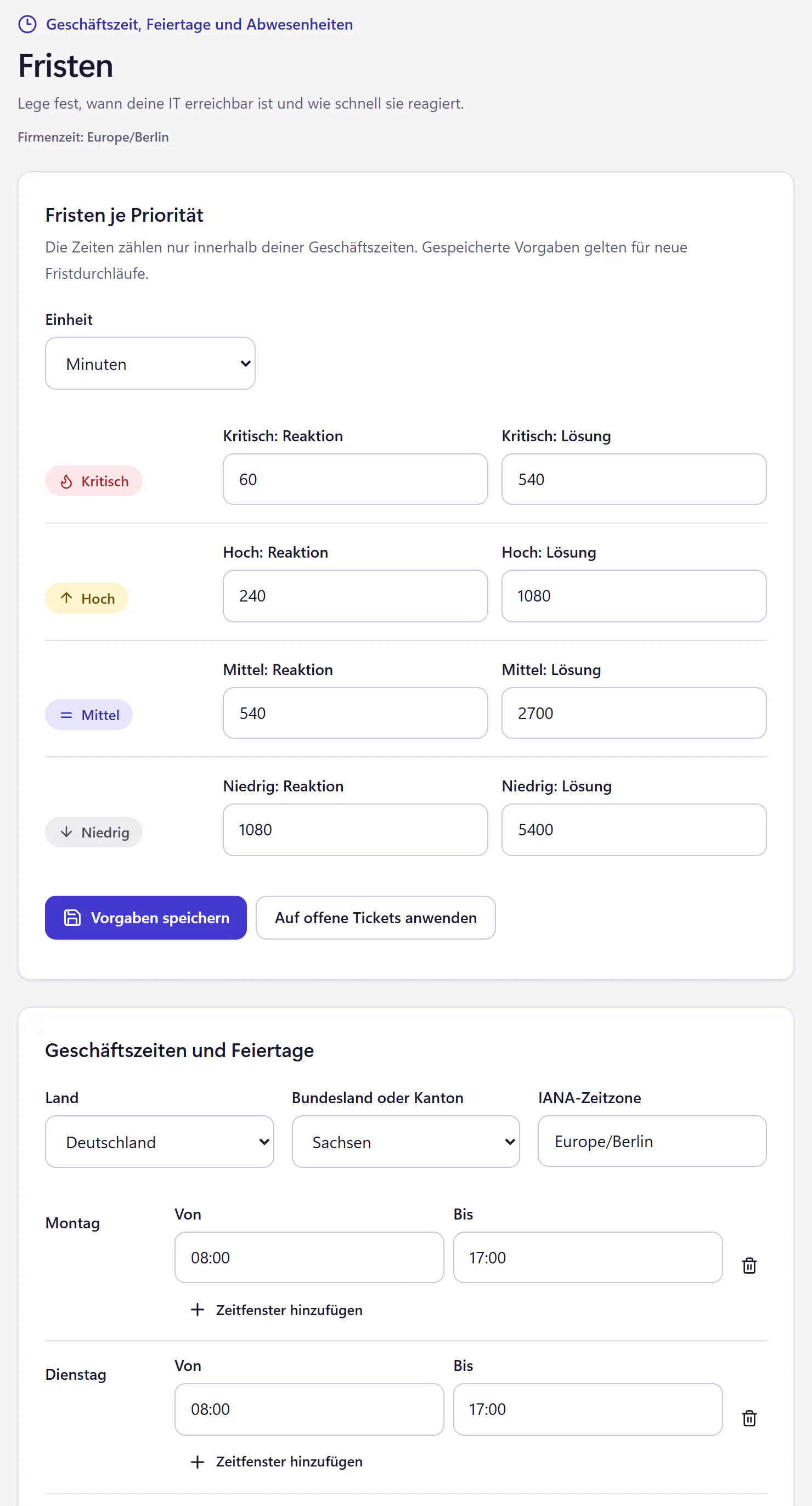
Set business hours
One or more time windows per weekday, for example Monday to Thursday 08:00 to 17:00 and Friday until 15:00.
Choose country and region
Germany, Austria or Switzerland, plus the state or canton. Public holidays then arrive automatically, including regional ones such as Corpus Christi. Holidays of individual municipalities and company shutdowns you enter as special days.
Set deadlines by priority
Critical, High, Medium and Low each get a response target and a resolution target, in minutes or hours. For example, High: respond within 1 hour, resolve within 4. Medium: respond within 4 hours, resolve within 8.
Set a warning
An email warns the assignee or the IT team ahead of a missed deadline, with the lead time you set. In the ticket list, every ticket shows when its response or resolution is due.
What the deadline calculation takes into account
- Business hours
- Only time inside your configured hours counts. Outside them the clock stands still, so at night and at weekends, depending on your settings.
- Public holidays
- By country and region for Germany, Austria and Switzerland.
- Absences
- Deadlines stand still when the whole of IT is absent. If only one of several people is away, they keep running.
- Pauses
- In the statuses "Wartet" (waiting for reply), "Pausiert" (paused) and "Terminiert" (scheduled), the deadline stands still, for example while waiting for a spare part.
- Changes
- New settings apply to new deadlines. If you wish, you can apply them to open tickets, and a preview first shows which tickets would get new deadlines.
- Analytics
- Deadlines met appear in Analytics and in the monthly IT service report.
- Not included
- Customer contracts and contractual penalties are not modelled. The deadlines are meant for your internal IT.
Who internal deadlines make sense for
Every IT team that gets asked how fast it actually is. With deadlines, the answer is a number instead of a feeling. The holiday calculation saves the discussion about why a ticket was supposedly overdue on Corpus Christi. The guide Calculating SLAs in business hours explains how to set sensible deadlines and check them by hand.
Frequently asked questions
Can I have different business hours for different locations?
No. Each company has one calendar with one timezone, one country and one region. If a holiday applies at one location only, you enter it as a special day when needed.
Does the deadline keep running while we wait for a reply?
No. In the statuses "Wartet" (waiting for reply), "Pausiert" (paused) and "Terminiert" (scheduled), the deadline stands still. You set the status deliberately, so that deadlines stay honest.
Do SLAs cost extra?
No. Like every feature, they are included in the core plan, from €29 per month.
Related features
- Cover and guest accessRecord absences and hand tickets to a colleague or external IT partner. Employees see who is covering. Guest access expires automatically.
- AnalyticsTrack ticket volume, first reply, resolution time, SLA performance, backlog, categories, satisfaction and workload. Export metrics as CSV.
- AutomationCreate plain-language rules for categories, priorities and assignment. Preview matches against past tickets and automatically close resolved tickets.