

Help desk security and GDPR: what we do and what we don’t
IT staff and admins can secure their sign-in with two-factor authentication, and for admins it can be made mandatory. Changes appear in your company audit log. Our support team cannot see ticket contents unless you give it temporary access. We show no seals or certificates because we have none. Here are the facts.
Security facts
As of 11 November 2026.
- Server location
- Germany, with Hetzner.
- Company workspace
- Each company has its own workspace at its own address, for example brenntal.404desk.de.
- Sign-in
- Microsoft 365 as the main route, plus email with a sign-in link and an optional password. Google accounts are not supported.
- Two-factor authentication
- A code from an authenticator app for IT and admins, which can be required of all admins. A rate limit slows down password guessing.
- Roles
- Employees, IT and admins.
- Audit log
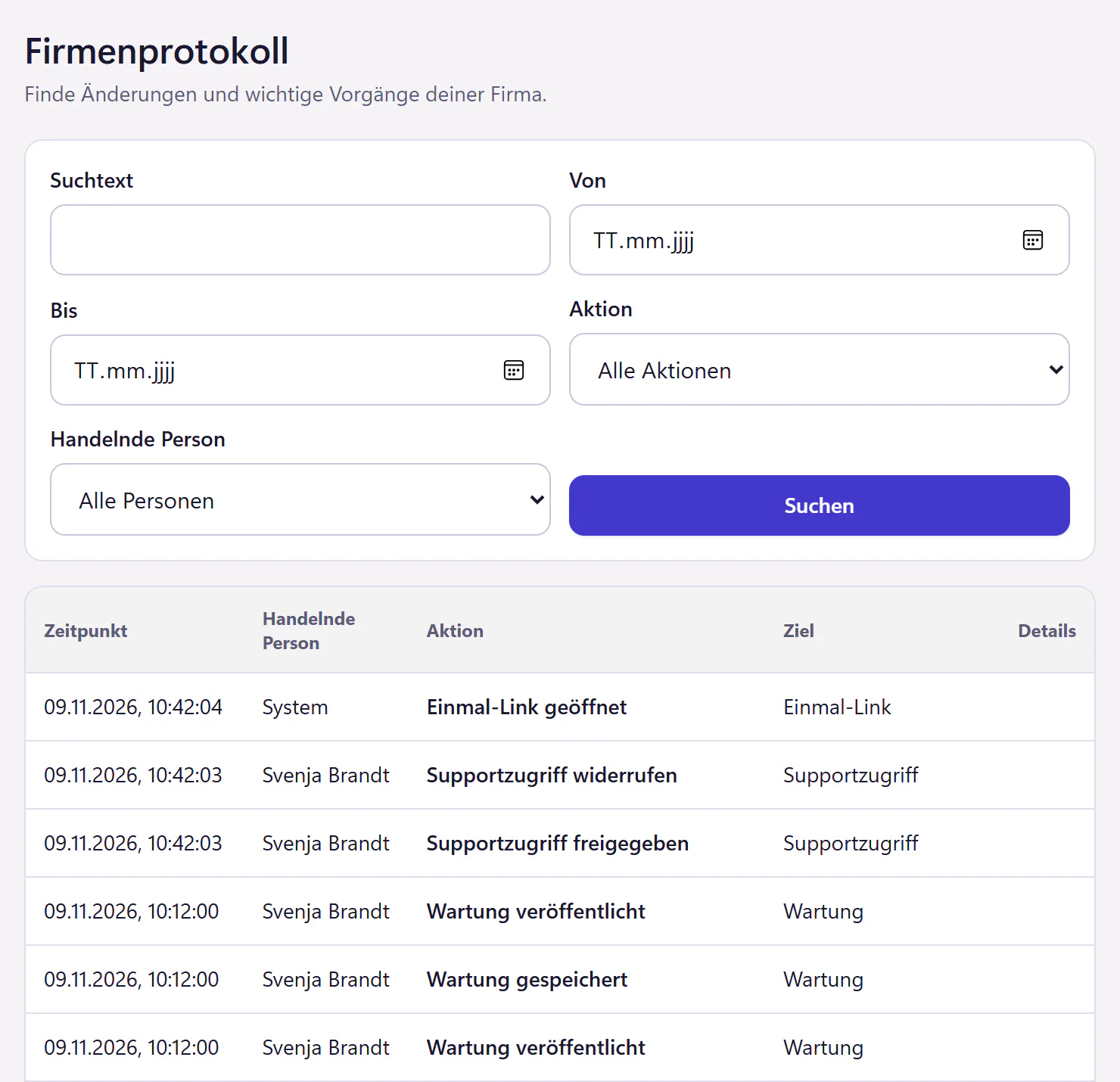
- Company changes and important events with the time and who performed them, searchable.
- Support access
- Only with your explicit approval, time-limited and read-only.
- Passwords in tickets
- They belong in a one-time link, which works exactly once and is valid for 24 hours at most.
- AI
- The built-in AI tools only run with the AI add-on. Before anything is sent, a redaction filter removes recognisable passwords, access keys, IBANs and email addresses. API and MCP servers that you connect yourself pass on ticket data regardless.
- Tracking
- No tracking cookies on this website, so no cookie banner.
Which service providers are involved
The binding list of subprocessors is in the data processing agreement (German).
| Provider | Purpose | When involved |
|---|---|---|
| Hetzner | Servers and storage for all data, located in Germany | Always |
| Mollie | Card and SEPA direct debit payments | Once you subscribe, payment data only |
| Langdock | AI features with a language model from Anthropic | Only with the AI add-on, after the redaction filter |
| Your Microsoft 365 | Sign-in and user sync | When you set up the integration. This is your own contract with Microsoft, not one of our service providers. |
Support access needs your approval
If you ask us to take a look at something, an admin grants support access with a purpose and an end date. The access is read-only. Without approval, we cannot see tickets, attachments or knowledge base content.
The grant appears in the audit log, which you can search yourself. When the time is up, the access is gone, with no one having to remember to remove it. You can also end it earlier.
Export, deletion and retention
An admin can request an export of the company data as a ZIP file at any time. Access keys and technical operating data are deliberately left out, and so are other people’s personal AI histories. That way you can take your data with you if you switch, without asking us. Deleting the company workspace is also started in the product, after you confirm with the company address. Invoice records stay in a separate archive for the required retention period, and backups expire on their own schedule.
Access and deletion are also available for individual people in the product. An admin downloads the data assigned to a person as a ZIP file and deletes their data after a preview. References in tickets then show “Deleted person”. 404desk does not clean up names in free text automatically, so the preview shows matches for manual review. Database backups are kept for up to 12 months, and after a restore the deletion is repeated.
Retention periods are up to you: completed tickets are anonymised automatically after the number of days you set. After a subscription ends, the workspace stays readable for 30 days, and we message you before it is deleted.
More on privacy and hosting.
Read the data processing agreement
We publish the text of the agreement up front so that your data protection officer can read it before the trial: read the DPA (in German). Admins can also find the agreement in the product under “Datenschutz” (privacy).
Redaction filter before every AI request
Without the AI add-on, the built-in AI tools do not send any ticket to an AI, and the AI buttons in the portal are not even visible. With the add-on, a redaction filter removes recognisable passwords, access keys, one-time links, IBANs and email addresses before anything is passed on. It does not recognise every piece of personal information. The filter does not apply to API and MCP servers that you connect to other services yourself.
You switch each AI tool on or off individually. Web search is separate and off by default. See AI in the ticketing system.
Security questions
Is 404desk ISO 27001 certified?
No. 404desk itself is not certified. This page lists what we actually do and which service providers are involved, and for what purpose.
Can your support team read our tickets?
No, not without your approval. An admin has to grant support access explicitly and for a limited time. The access is read-only, and the grant is recorded in the audit log.
What happens when an account is blocked in Microsoft 365?
With user sync, the block is applied at the next sync, which runs every 15 minutes. Larger waves of blocks need an admin’s confirmation first. Deactivating the account directly in 404desk takes effect immediately.
Can we get our data back?
Yes. An admin can request an export of the company data as a ZIP file at any time. Access keys and technical operating data are deliberately left out, and so are other people’s personal AI histories. Deleting the company workspace can also be started in the product.
More on security
- Privacy and hostingCompany data export, workspace deletion, retention periods you set yourself and a data processing agreement. Review hosting and privacy controls before a trial.
- One-time linksShare a password through a link that reveals it once and expires within 24 hours. Keep secrets out of ticket histories and email bodies.
- Microsoft 365Microsoft 365 sign-in and Entra ID user sync, including account status. Forward your IT mailbox for email ticketing. No Google sign-in.