

Help desk automation in plain sentences
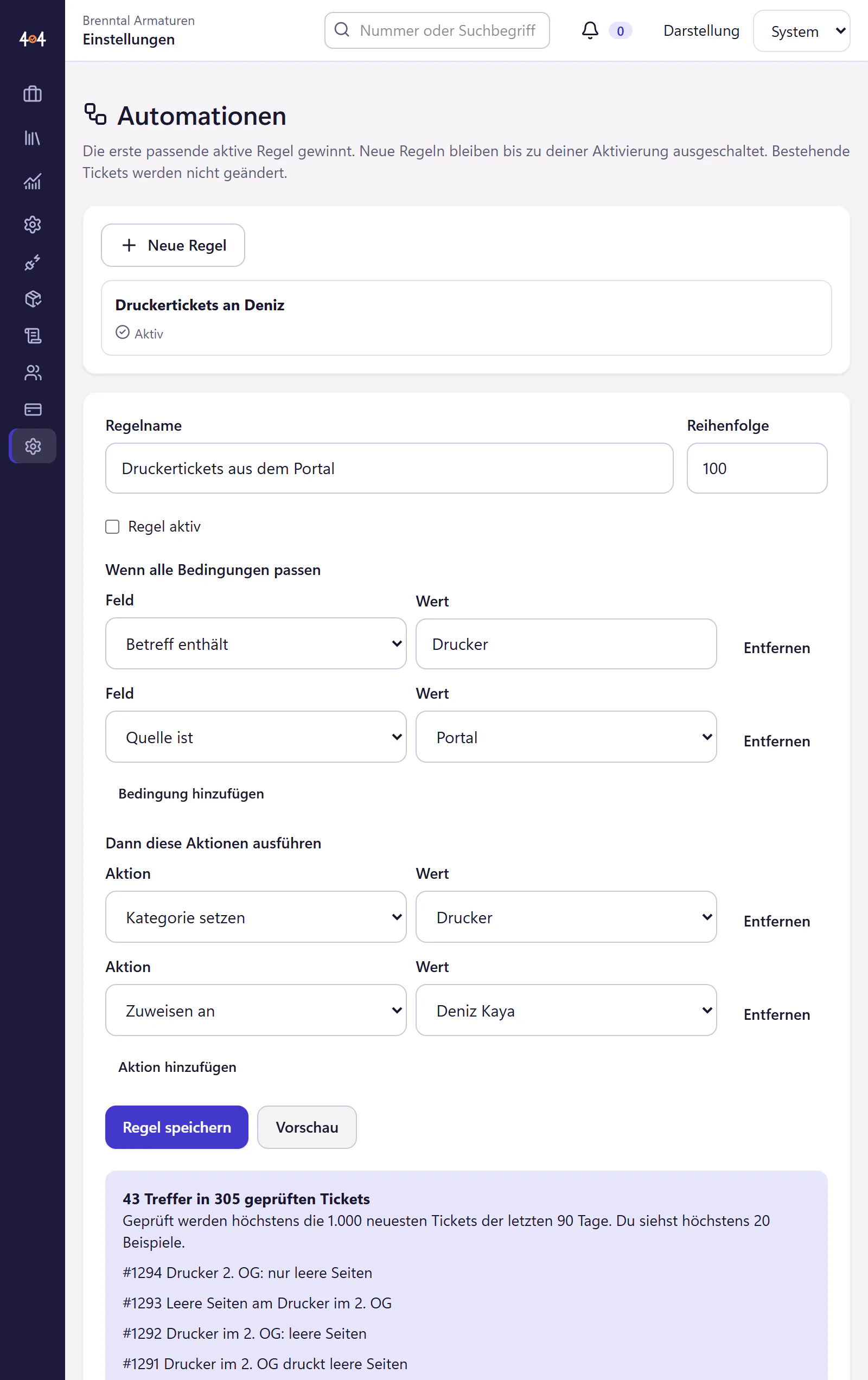
You read an automation like a sentence: “If the subject contains printer, set the category to printer and assign the ticket to Deniz.” Before you switch a rule on, a preview shows which past tickets it would have matched. Resolved tickets can also be closed automatically after a number of days without a reply, which you set.
How to create an automation
Choose conditions
The subject contains a word, or the ticket’s status, priority, category or source has a certain value. A rule has up to five conditions, and all of them must match.
Choose actions
Set a category, assign the ticket, set the priority. Several actions are possible.
Read the preview
404desk checks the latest tickets from the past 90 days and shows examples that the rule would have matched. That way you can see whether “printer” also catches the ink cartridge order.
Switch it on
A new rule stays off until you switch it on. From then on it applies to new tickets. You can switch it off at any time without deleting it.
What automations can do
- Rules in plain language
- If-then rules in whole sentences, without a formula language. The editor itself is in German.
- Preview
- Which past tickets the rule would have matched, before it goes live.
- Automatic closing
- Resolved tickets are closed after a number of days that you set. A new reply from the requester prevents closing.
- Monitoring alerts
- Separate rules for emails from backup and monitoring systems, which assign technical messages to an alert incident. More under email ticketing.
- Templates
- Under "Vorlagen übernehmen" (apply templates) there are ready-made rules for typical cases. They stay off until you switch them on.
- Not included
- No "or" within a rule, no scripts and no workflows with branches across several departments. If you need more, use webhooks and the REST API.
Who automations are worth it for
From the moment two people work in IT and share out tickets by topic. Printer issues go to Deniz, permissions to Svenja, everything with Critical priority to the lead. In one-person IT, automatic closing is what helps most, because otherwise resolved tickets stay in the list forever.
The preview is the part that matters. A rule with “printer” in the subject sounds harmless, until it also sends the ink cartridge order to the printer expert. In the preview you see that before it happens, not three weeks later.
How to share out work in a small team is covered under help desk software for IT teams.
Questions about automations
Does a new rule also affect old tickets?
No. The preview shows old tickets only so you can check the rule. It applies to new tickets from the moment you switch it on and does not change existing ones.
What happens if two rules match?
The first matching active rule wins. Further rules then do not apply to that ticket.
Do I need the AI add-on for this?
No. Automations are fixed rules and included in the core plan. If you buy it, the AI add-on can also pre-sort tickets.
Related features
- Recurring tasksCreate tickets on a schedule, with checklists for backup checks, updates and access reviews. Preview the upcoming dates and choose an assignee.
- API, webhooks and MCPConnect scripts and AI assistants to tickets with a REST API, signed webhooks and an MCP server. Keys and permissions are set per company, with no fee per call.
- AI add-onPre-sorting, reply suggestions, summaries and an IT help chat. Each feature has its own switch, with a redaction filter and prepaid credit. A person confirms ticket changes.